Overview
In my graphic design class (GD `160 – Digital Graphic Design: Tools & Methods), we had to make an app wireframe for a nonprofit organization of our choice. I chose to design an app for Phoenix Community Farm in Midland, MI. We had to base the app off of a need and a task. My need was, “A volunteer needs to sign up to volunteer at the Phoenix Community Farm Harvest Celebration on Saturday,” and my task was, “The volunteer goes to the Phoenix Community Farm app to sign up to volunteer at the Harvest Celebration on Saturday from 12 pm – 3 pm.
Process
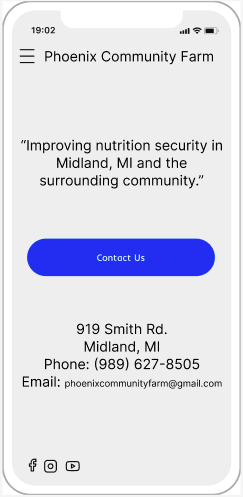
First, I designed a homepage for the app, which included their motto, address, email, phone number, and a contact button. In the top corner, there is an option to expand a menu. In the menu there is navigation to the home, about, volunteer, announcement, donation, and gallery pages.
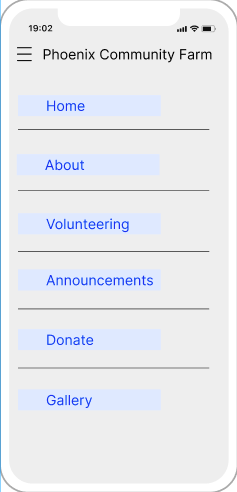
Based on the task, when the user views the menu, they will click on the “Volunteering” tab. This takes you to the volunteering page where you can view the general harvest volunteer times and upcoming events.
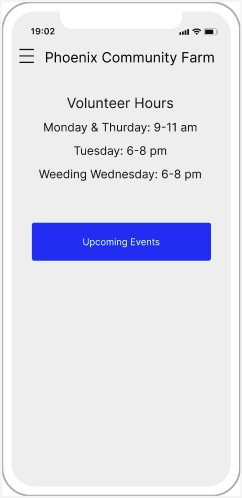
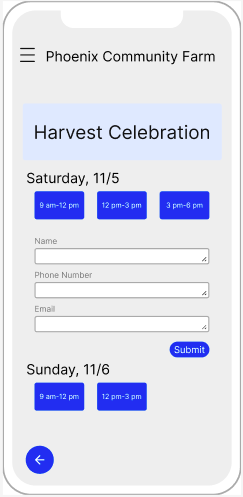
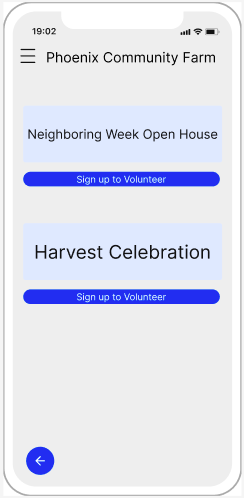
When the user clicks on “Upcoming Events,” they are directed to a page with all of the upcoming events with PCF and options to sign up to volunteer. When they click on “Sign up to Volunteer,” they are directed to a page with all of the dates and times they can sign up for for that event.
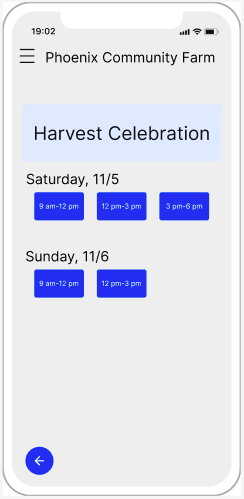
Based on the task, they will choose to volunteer on Saturday from
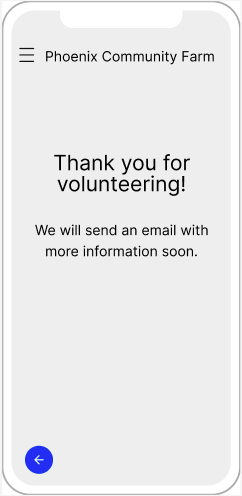
12 pm – 3 pm. Once they select that time, they will be directed to a page to input their information and then a confirmation/thank you page.